Wine is a compatibility layer for running Windows applications on Linux.
Applications are run at full speed without the need of cpu emulation.
There are two ways to install Wine in Ubuntu; from the Ubuntu repository and from Wine official repository. Both have advantages and disadvantages but both offer an amazing compatibility layer for running Windows applications in Linux.
Get the Stable Version
Version 1.0.1 is available in the Ubuntu repositories. Canonical does not provide updates for wine, but this version is better tested. It is not prone to regressions and broken functionality.
To Install Wine
In a terminal type:
sudo apt-get install wine
Get the Newest Version
These packages are development packages, they will periodically suffer from regressions, and may break functionality in Wine. If the stable release in the Ubuntu repositories of Wine works for you, then you may not want to use the development packages.
Add repository key
In a terminal type:
wget -q http://wine.budgetdedicated.com/apt/387EE263.gpg -O- | sudo apt-key add -
Add Wine repository
In a terminal type:
sudo wget http://wine.budgetdedicated.com/apt/sources.list.d/intrepid.list -O /etc/apt/sources.list.d/winehq.list
Update your system
In a terminal type:
sudo apt-get update
To install Wine
In a terminal type:
sudo apt-get install wine
After Install
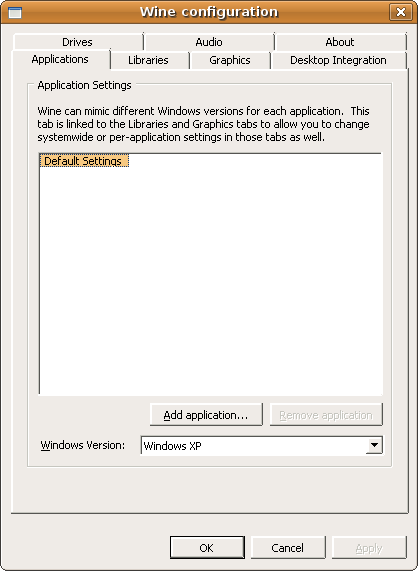
Once installed (either method) you can configure Wine by running:
winecfg
(either in a terminal or in the Run Application box)
Make Wine Graphical User Interface Match Ubuntu's
Ina terminal type:
gedit ~/.wine/user.reg
Replace the [Control Panel\\Colors] section with:
[Control Panel\\Colors] 1176981676
"ActiveBorder"="239 235 231"
"ActiveTitle"="203 133 61"
"AppWorkSpace"="198 198 191"
"Background"="93 77 52"
"ButtonAlternativeFace"="200 0 0"
"ButtonDkShadow"="85 85 82"
"ButtonFace"="239 235 231"
"ButtonHilight"="255 255 255"
"ButtonLight"="255 255 255"
"ButtonShadow"="198 198 191"
"ButtonText"="0 0 0"
"GradientActiveTitle"="239 235 231"
"GradientInactiveTitle"="239 235 231"
"GrayText"="198 198 191"
"Hilight"="246 200 129"
"HilightText"="0 0 0"
"InactiveBorder"="239 235 231"
"InactiveTitle"="239 235 231"
"InactiveTitleText"="255 255 255"
"InfoText"="0 0 0"
"InfoWindow"="255 255 166"
"Menu"="239 235 231"
"MenuBar"="239 235 231"
"MenuHilight"="246 200 129"
"MenuText"="0 0 0"
"Scrollbar"="239 235 231"
"TitleText"="255 255 255"
"Window"="255 255 255"
"WindowFrame"="0 0 0"
"WindowText"="0 0 0"
Before Changing Colors

After Changing Colors