Showing posts with label gtk theme. Show all posts

Friday, April 9, 2010

The Window Buttons are Now Set in Stone

As many of you know, the window buttons have moved to the left for the new Ubuntu 10.04 Lucid Lynx themes.

There was a lot of controversy about the move and the new button order. Users considering leaving the Ubuntu project over the lack of user input in the decision.

The controversy is over and the final button order has been decided: close, minimize and maximize. The order makes sense to me and the move to the left of the screen doesn't bother me.

Everyone can calm down and focus on the real issue, Ubuntu 10.04 beta testing.

window buttons ambience
-Ubuntu's Ambiance Theme

window buttons radiance< - Ubuntu's Radiance Theme For more about Ubuntu's new brand change

Have a question or problem that this article doesn't cover?
Ask our Ubuntu Mini 9 Google Group for help.

Tuesday, March 2, 2010

Black Human GTK Theme

Black Human is based on the Ubuntu Human-Murrine color scheme by Kenneth Wimer & Conn O'Griofa.

Black Human GTK
- click to enlarge

The theme uses gtk2-engines-murrine and my Carbonate icon theme. It was designed to be a black and dark grey take on the default Ubuntu Human theme.

Black Human - folder


Black Human - twf
- click to enlarge

If you'd like to install Black Human, you will first need to install some dependencies.
In a terminal type:
sudo apt-get install gtk2-engines-murrine gnome-colors-common

Also download and install my Carbonate icon theme.
- After downloading the gnome-carbonate.tar.gz, uncompress it and copy to your ~/.icon folder.

To install the Black Human GTK theme:
- Download the Black Human theme via gnomelook.org
- Go to System>Preferences>Appearance.
- Click install and select the Black Human.tar.bz2 file you downloaded

Black Human Install

Black Human does have a few quirks. For directions on tweaking Firefox and OpenOffice to look better when using Black Human, follow the directions on my Black Human Fixes article.

If you link the theme, rate it, share it, and enjoy!


Have a question or problem that this article doesn't cover?
Ask our Ubuntu Mini 9 Google Group for help.

Friday, December 11, 2009

Darkish Human GTK Theme

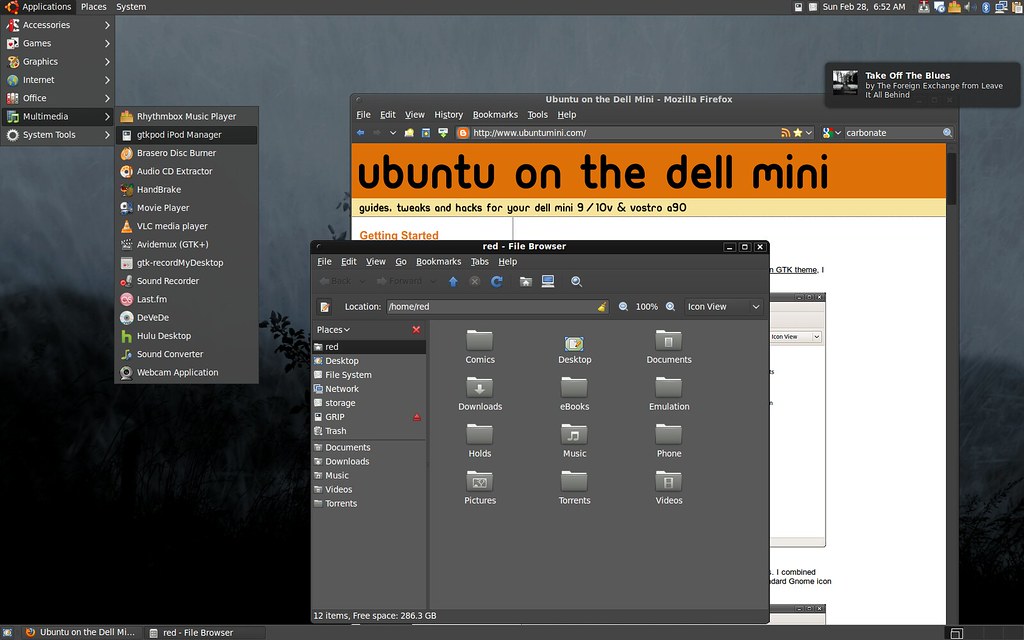
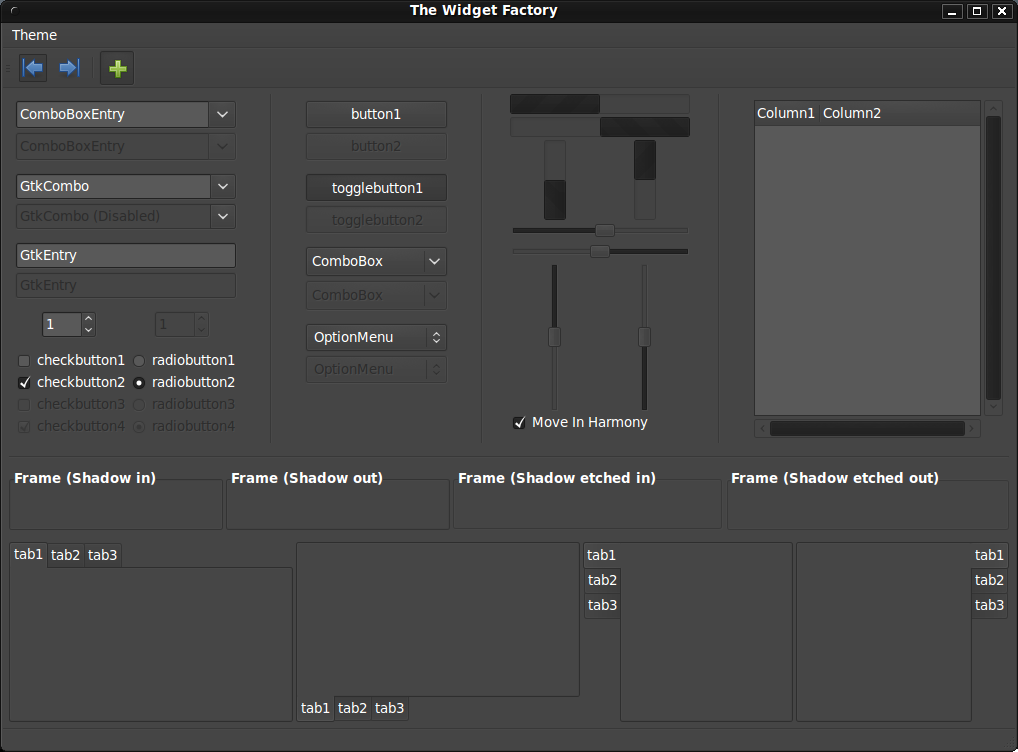
I spent a very long time making this theme, I hope you like it. I wanted something a bit lighter than my Dark Human Theme.

darkish human desktop

darkish human widget factory

Darkish Human is based on the Ubuntu Human-Murrine color scheme by Kenneth Wimer & Conn O'Griofa.

You can download it via www.gnome-look.org, don't forget to rate it while you're there.

Theme uses:
gtk2-engines-murrine
gnome-brave-icon-theme

To install these dependencies
in a terminal type:
sudo apt-get install gtk2-engines-murrine gnome-brave-icon-theme

You can find the Dusk of Ubuntu wallpaper used here.

To install the Darkish Human GTK theme:
Appearance Preferences
- Go to System>Preferences>Appearance.
- Click install and select the Darkish Human.tar.bz2

Friday, September 11, 2009

Make Your Root Windows Pretty

When modfying your system theme the changes often do not apply to the root account. When running programs as the super user (sudo) the window theme looks likea very ugly Windows 95 clone. With two lines of code we are going to link your user and root themes so they match, and bring back the pretty in Ubuntu.

- Notice the Windows 98 feel to these root menus
synaptic (ugly)

root window (ugly)


In a terminal type:
sudo ln -s ~/.themes /root/.themes
sudo ln -s ~/.icons /root/.icons

- Now when you run programs as the super user they match the system theme.
synaptic (fixed)

root window (fixed)

and as synthetic098 pointed out:
In a terminal type:
sudo ln -s ~/.fonts /root/.fonts
- to symbolically link your fonts to the root fonts

Have a question or problem that this article doesn't cover?
Ask our Ubuntu Mini 9 Google Group for help.

Saturday, May 23, 2009

Dark Human GTK Theme

My custom GTK theme is nothing fancy. Dark Human is a combination of the included Dust and Human themes with the colors tweaked to compliment the dark gray.

Download My Dark Human Theme

Dark Human with Menu
- the desktop and menus.

Download The Background

Appearance Preferences
- To install the theme go to System>Preferences>Appearance.
- Click install and select the Dark Human.tar.gz.

home_folder
- Nautilus (still clinging to the orange)

Firefox_screenshot
- The smaller scroll bars and my custom Firefox menu help maximize screen space. You can use this guide to shrink/tweak your Firefox.

my_desktop
- Same setup with Ubuntu Netbook Remix running. It's pretty.

Have a question or problem that this article doesn't cover?
Ask our Ubuntu Mini 9 Google Group for help.